Breadboard Basics
What You’ll Learn
- What a breadboard is
- How internal connections work
- How power rails are arranged
- Common beginner mistakes
Watch the Breadboard Basics Video:
Quick Recap:
A breadboard allows you to build and test circuits without soldering. To understand the layout clearly, think about the board in terms of its width. If you look at the breadboard width-wise:
- The power rails run horizontally across the board.
- The component rails (terminal strips) run vertically.
- The center gap separates the two vertical component sections.
- Components placed in the same vertical strip are electrically connected.
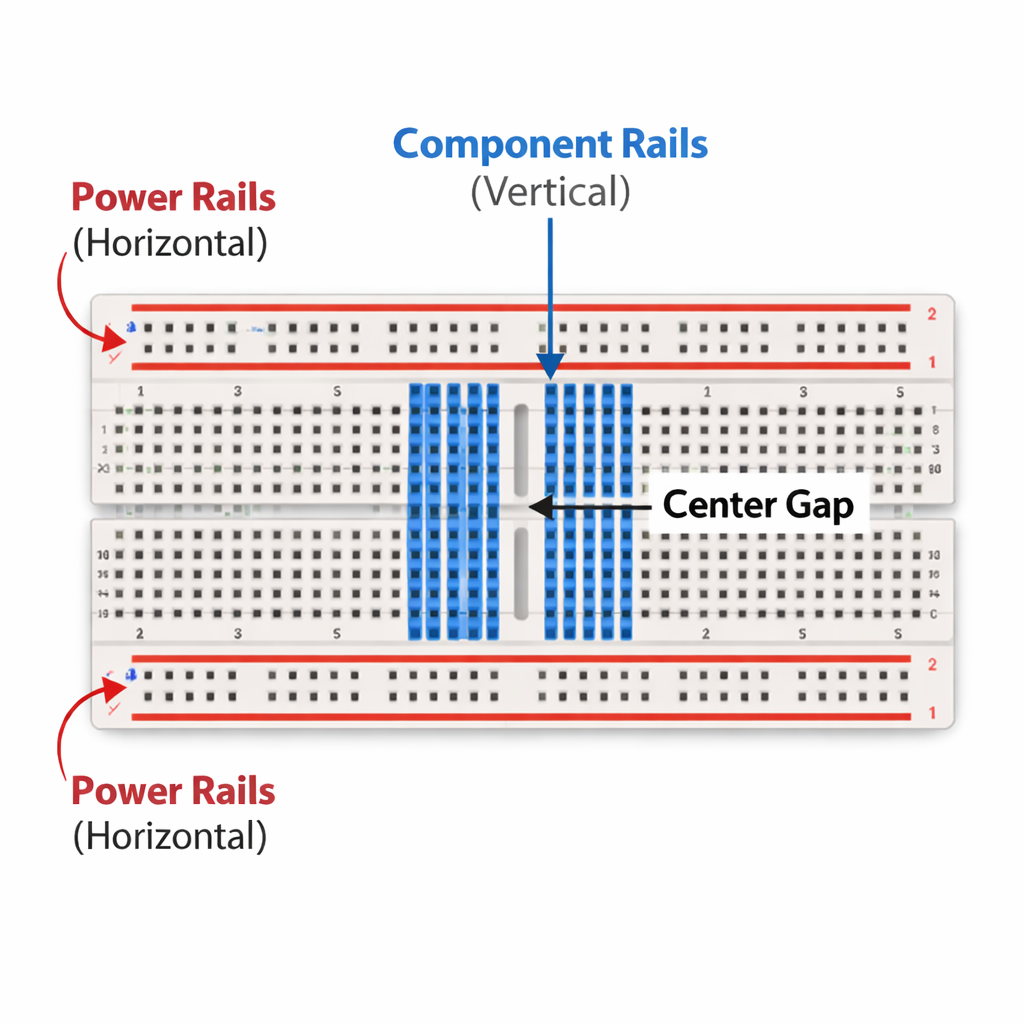
If you remember the width-wise orientation —power rails horizontal, component rails vertical —you’ll avoid most beginner wiring mistakes.
Breadboarding Mistakes to look out for:
Understanding orientation is where most beginners get tripped up.
1️⃣ Mixing up horizontal vs vertical connections:
If you look at the breadboard width-wise:
Power rails run horizontally.
Component rails run vertically.
Confusing those directions leads to wiring errors.
2️⃣ Placing both legs of a component in the same vertical strip:
Since component rails run vertically, putting both legs of a resistor or LED in the same vertical strip shorts it.
3️⃣ Thinking the center gap connects both sides:
The center gap separates the two vertical component sections.
Nothing connects across that gap unless you add a jumper.
4️⃣ Assuming power rails are continuous end-to-end:
Some breadboards split the horizontal power rails in the middle.
Always test continuity if you’re unsure.
5️⃣ Skipping verification with a multimeter
A quick continuity test confirms how your breadboard is wired.
Never guess — test.
Prefer video?
Watch full lessons on the Build Circuits With Rich YouTube Channel.
Back To: Videos